• Themes
  • Templates
  • Freebies
  • Get Help
    • Knowledge Base
    • Support
    • Contact
  • 0

    Number of items in cart: 0

    • Your cart is empty.
    • Total: $0.00
    • Checkout
  • Log In
  • Sign Up
  • Themes
  • Templates
  • Freebies
  • Get Help
    • Knowledge Base
    • Support
    • Contact
  • 0

    Number of items in cart: 0

    • Your cart is empty.
    • Total: $0.00
    • Checkout
  • Log In
  • Sign Up
Khaki WP

Khaki WP

  • Home
  • Knowledge Base
  • Khaki WP
  • Menus
  • Get Started
  • Theme Options
    • Customizer
    • Navigation Login Form
    • Meta Boxes
  • Menus
    • Main Menu
    • Top Menu
    • Top Icons Menu
    • Mega Menu
  • Shortcodes
  • Forms
  • Changelog
  • Credits
    • Libraries
    • Images
    • Music
    • Plugins
  • Thank You!

Mega Menu

  1. Navigate to Appearance → Menus and add own menu or edit existing
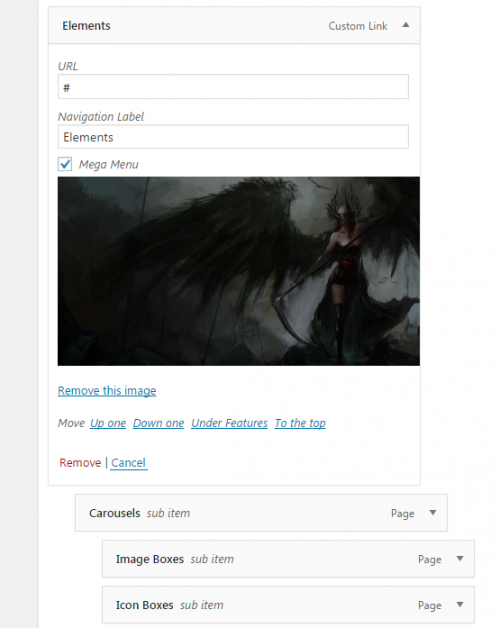
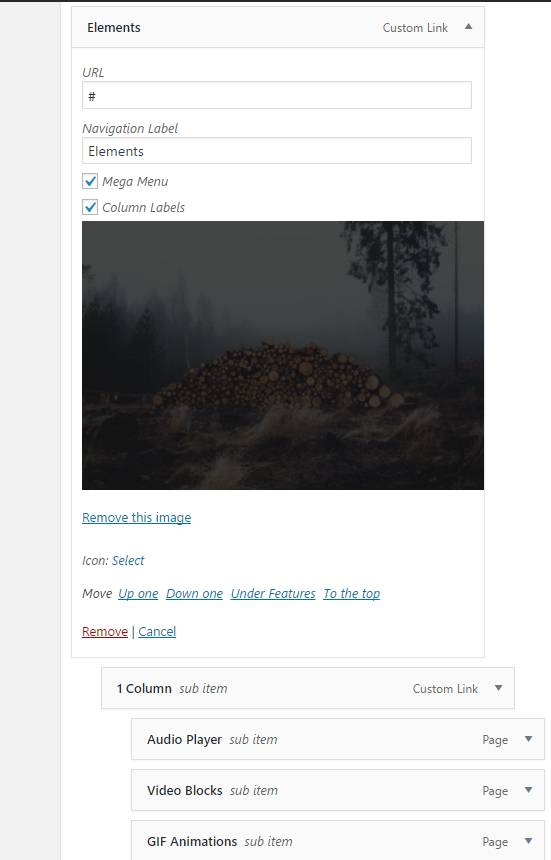
  2. For select tab 1 lvl, for example, Elements, click on Mega Menu checkbox and add Mega Menu Background Image as shown below.
  1. Save menu and check the result.
Last modified October 9, 2020

Doc navigation

< Top Icons Menu

nK © 2025 All rights reserved.

Log In

Login With Envato
OR
Reset your password Sign Up

Sign Up

Login With Envato
OR

Reset Password